You’re already an SEO sensei. You’re a content creator, PPC pro, marketing maven, and analytics ace. If you need it for online success, you’re aware of it and on top of it.
But if you’re only using “regular” old Google Analytics, you’re missing out on a ton of valuable and free data that could help you increase revenue, engagement, and clicks. That’s the ecommerce trifecta. How do you get there?
Three words: enhanced ecommerce plugin.
Introduced about two years ago, the Google Analytics enhanced ecommerce plugin – or ec.js – offers up the kind of data you could only dream of in the past. And yet, many ecommerce sites still aren’t using it.
Out With the Old
The old way: Analytics collected data after a purchase, typically using a destination goal (such as your “thanks for buying!” page). You could track number of impressions, the conversion rate, and the value of those sales.
That’s all helpful stuff, no doubt. If you’re an intermediate user, you might even be tracking, comparing, and analyzing other statistics to guide your marketing. Nothing wrong with that.
But as an ecommerce site, wouldn’t it be nice to have beneficial data about customer behavior before they buy?
Enter the ec.js plugin.
The new way: the entire customer journey – from arriving at a page, through research, evaluation, purchase, and even returns – is tracked and collected.
What Can the Plugin Do?
A little bit of everything you need:
- Customer behavior at every stage of the funnel – before, during, and after a purchase.
- Detailed reports on average order value, percentage of visitors who added items to the carts, average number of items in an order, affiliate records (number of transactions, revenue, and AOV from affiliates sending traffic to your portal), and cart abandonment rates.
- How, when, and where customers are initiating a purchase and/or abandoning it – at which step in your funnel are you losing them?
- Engagement – views and purchases.
- Product coupon reports to see transactions and profit revenue per order (are coupons actually helping?).
- And more…
Sounds too good to be true, doesn’t it? But it’s all there for the taking. The only issue is that installation is a lot more complicated than just turning it on.
For our purposes here, I’m going to assume you’re familiar with the basics of Analytics.
Installing the Enhanced Ecommerce Plugin
Let’s not beat around the bush: this is not easy, quick, or simple. It requires an understanding of javascript and coding that not everyone possesses. Avoid the headaches and frustration that will inevitably come with doing it yourself and consider outsourcing to an experienced web developer that can handle the tricky bits for you.
Alternatively, if you’re lucky, your ecommerce platform may be one with built-in integration, including:
- Shopify and their paid Actionable Google Analytics app for $39/month.
- WordPress with WooCommerce users can try the Enhanced Ecommerce Google Analytics Plugin.
- Magento and their Enhanced Ecommerce extension.
The Enhanced Ecommerce plugin should not be used with the Ecommerce plugin (which tracks transaction and item data). If you previously implemented the Ecommerce plugin, you should either create and use a new property (and work with multiple trackers), or migrate your existing property from Ecommerce to Enhanced Ecommerce (by removing and replacing references with the enhanced code).
If you opt for the DIY route, installing the plugin can be accomplished in three steps:
- Ensure you’re using Universal Analytics, as ec.js will only work with that protocol. If you’re still using Classic Analytics, you need to update to Universal (you’ll see a
- “Universal Analytics Upgrade” link in the Property column on the Admin tab).
- Install the appropriate ec.js tracking code on every page of your website that you want to track.
- Once everything’s in place, enable Enhanced Ecommerce Settings on Analytics under Admin > View > Ecommerce Settings.
And done (if only it were that easy). Unfortunately, it’s that second step that can cause you to pull your hair out.
To load the enhanced ecommerce plugin, use the command ga(‘require’, ‘ec’); after you create your tracker object and before you use any of the specific functionality in your Analytics tracking code.
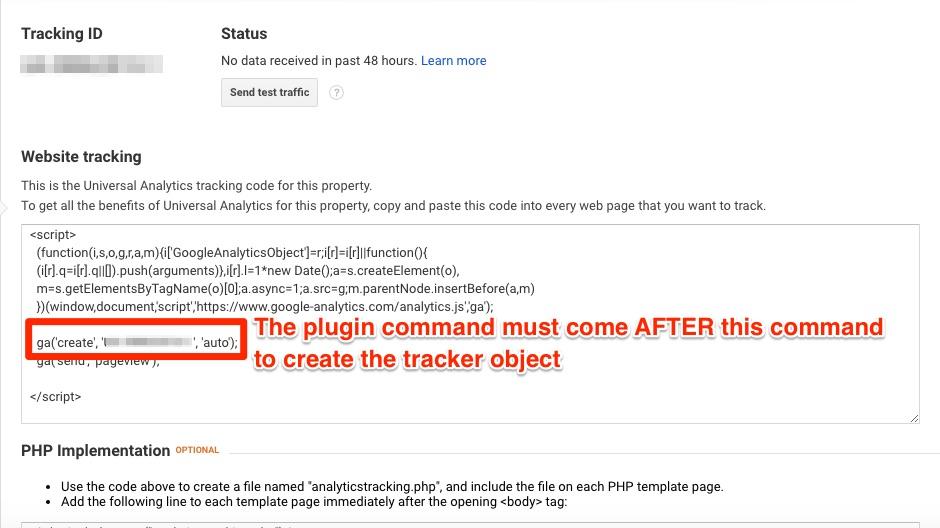
Within your tracking code, the order is all important:
- ga(‘create’, ‘UA-XXXXXXXX-X’, ‘auto’); command to create your tracking code must come first
- ga(‘require’, ‘ec’); command for the enhanced ecommerce plugin must follow it
- Specific plugin commands appear next (more on this below)
- Finally, near the bottom, you need a command to send the data to Analytics such as ga(‘send’, ‘pageview’);
You create the tracker code, load the ec.js plugin, execute the specific function(s), and then send the data, in that – and only that – sequence. Otherwise, there’s no joy.
The features of the enhanced ecommerce plugin are too extensive to examine them all here. Instead, let’s take a look at some of the best functions to try out first.
The Plugin Data Types
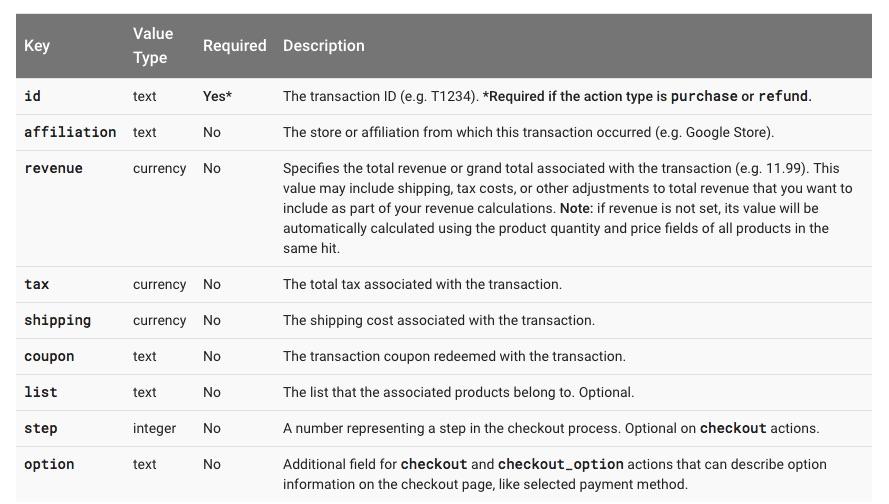
There are four categories of data you can collect for Analytics using the ec.js, and actions such as click, add, remove, checkout, purchase, and refund can further allow you to understand collected data falling under product or promotion.
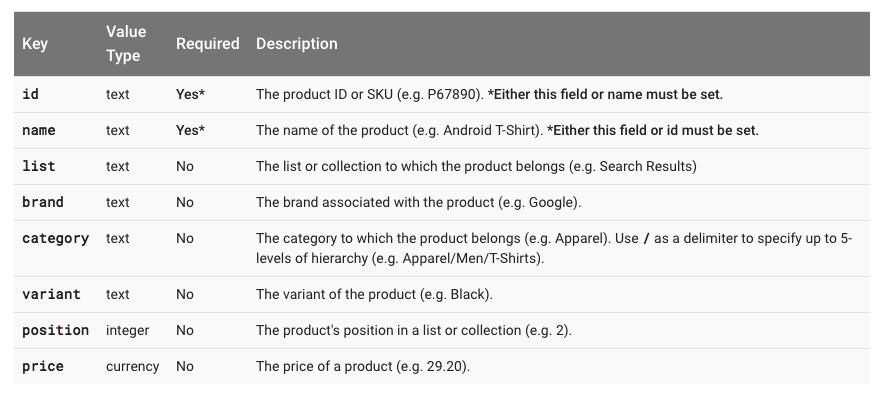
Impressions
Information on products that have been viewed, and referred to as an impressionFieldObject.
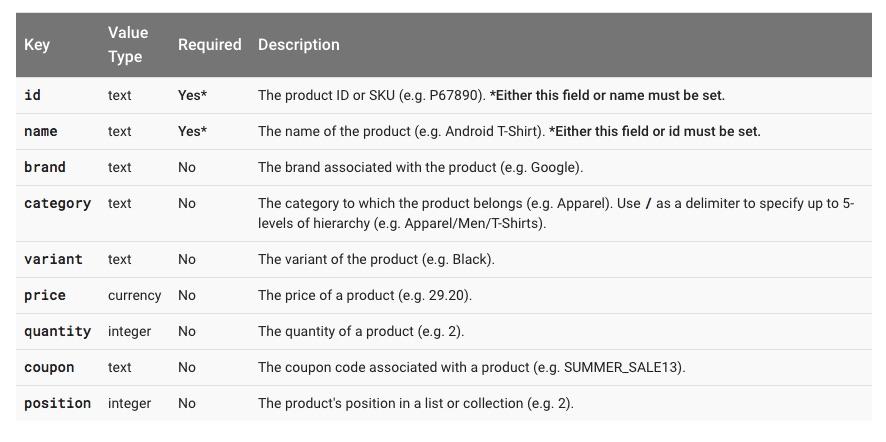
Product
Data on the individual products viewed, added to cart, and so on. Referred to as a productFieldObject.
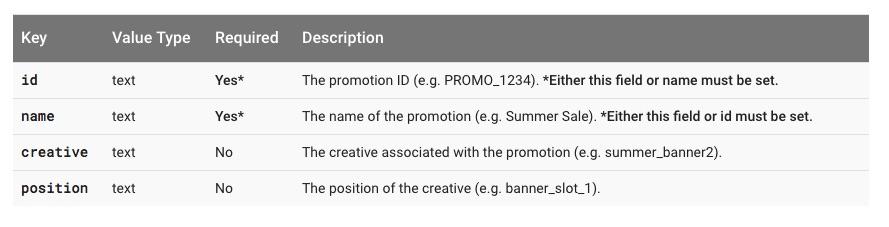
Promotion
Information about viewed promotions, and referred to as a promoFieldObject.
Action
Details about action related specifically to ecommerce, and referred to as an actionFieldObject.
The Plugin Features
With the Analytics Enhanced Ecommerce plugin, you can track a wide variety of events and actions with the proper command added to the tracking code. The devil in the details, of course, is finding the right command for the right page for the right feature.
Under Conversions > Ecommerce on the Analytics Reporting page, you’ll find two incredibly valuable reports to assist your business and get you started.
Shopping Behavior Analysis
This report shows concrete statistics on how many customers moved from one stage to the next of your sales funnel.
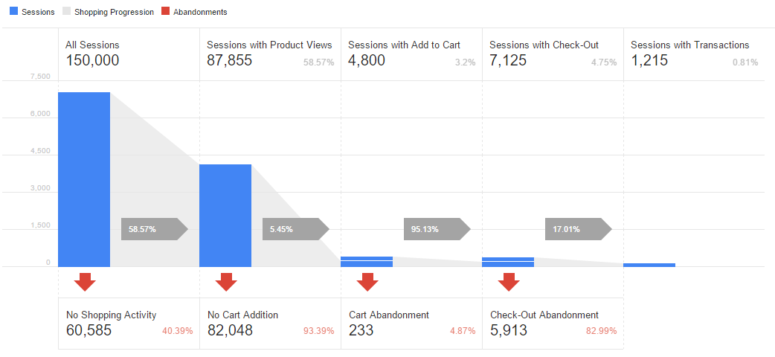
Here, you’ll see how many sessions occurred during a set period of time, how many of those left without shopping (looking at products), how many sessions with product views, how many left without adding anything to their cart, how many did add something to their cart, how many of those abandoned it, how many initiated checkout, how many abandoned checkout, and ultimately how many sessions ended in a successful transaction (a purchase was made).

Did you know? With Kissmetrics Analytics, you’ll see who drops out of your funnel. Identify where you’re losing customers, and retarget them using our MailChimp integration.
Why Is Shopping Behavior Important?
Having a clear idea of where you’re losing visitors in your funnel can give you insight on how to fix it.
Lots of product views, but most leaving without adding anything to their cart? Evaluate the strength of your product descriptions, and/or consider adding product reviews, testimonials, or tutorials right on the page.
Too many people abandoning their cart without checkout? Perhaps throw in free shipping, volume discounts, BOGO promotions, or compare to check if your prices are competitive.
Checkouts initiated but then abandoned? Simplify and streamline the process. Eliminate hidden fees and surprises. Make it easy for them to buy.
Setting It Up
In order to collect the necessary data, you’ll need to implement the following commands to the following pages:
- Measure Impressions on Products: use the ‘ec:addImpression’ command, along with the product ID or name. All other fields are optional. This will track the times that a visitor sees a product in a list (category page, search results, top sellers…anywhere other than its dedicated page). Where: any page where the product is listed.
- Measure Clicks on Specific Products: use the ‘ec:addProduct’ command (with ID and/or name) followed by the ‘ec:setAction’, ‘click’ command. Where: any page where the product is listed. Ask your developer to use the ‘onClick’ event handler to tie the ‘onProductClick’ function.
- Measure Product Detail Views: use the ‘ec:addProduct’ command followed by the ‘ec:setAction’, ‘detail’ to measure the product page views. Where: the dedicated product page.
- Measure Items to Cart: use ‘ec:addProduct’ followed by ‘ec:setAction’, ‘add’ command. Ask your developer to use the ‘onClick’ event handler to tie the ‘addToCart’ function.
- Where: each dedicated product page “add” button.
- Measure Checkouts Initiated: use ‘ec:addProduct’ followed by the ‘ec:setAction’, ‘checkout’, {‘step’:1} command.
- Measure Completed Purchases: use ‘ec:addProduct’ followed by the ‘ec:setAction’, ‘purchase’ command.
Easy and straightforward? Not at all. But seeing exactly where your numbers are dropping or bottlenecking in the funnel makes it all worthwhile.
Checkout Behavior Analysis
This report functions much like the Shopping Behavior, but it focuses strictly on the steps involved in your checkout.
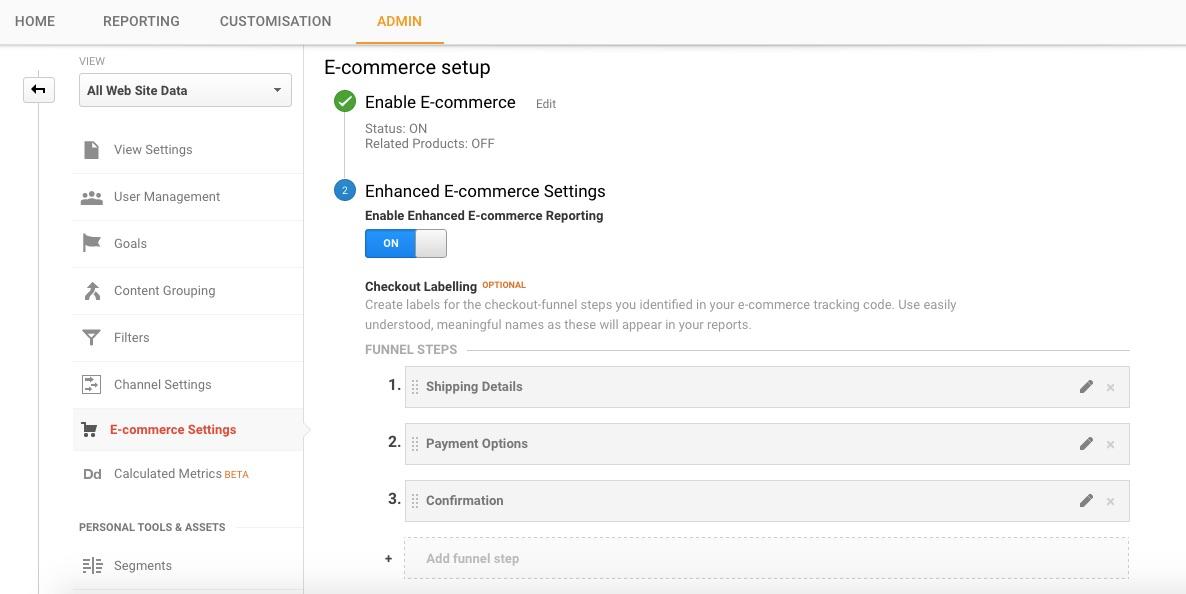
Before we go any further, you need to ensure the steps of your checkout are filled in on Analytics under Admin > View > Ecommerce Settings.
Assign each step a straightforward name such as “Shipping Details”, “Payment Options”, and “Confirmation”.
Each page in your checkout funnel requires its own tracking code with appropriate plugin commands.
Use ‘ec:addProduct’ followed by the ‘ec:setAction’, ‘checkout’, {‘step’:1} command for the first page, changing the step number with each subsequent page as you move through it.
As much as 70% will abandon their shopping cart for some reason. They may be annoyed by a redirected checkout (taking them to a different domain), concerned about a sketchy looking URL (aim for http://www.yoursite.com/checkout), unhappy with unexpected charges or other surprises introduced at this late stage, or irritated by a multi or single page process (it’s worth A/B testing to determine which your customers prefer).
Another dealbreaker for many is a lack of guest checkout. Don’t force visitors to create an account with you before making a purchase, as 23% will abandon their cart according to Forrester Research. Ideally, provide them with both options (create an account, or checkout quickly as a guest).
With the Checkout Behavior report, you can see concrete numbers for each step: how many made it to step one, what was the drop-off for step two, and so on.
If you see, for example, that the bulk of your abandoned carts occur at payment options, perhaps you need to provide more choice for your customers. If too many are walking at the shipping page, you might need to offer cheaper options. Use the data to give your customers what they seem to be craving.
Other Tracking Features
The plugin does more: track refunds with the ‘ec:setAction’, ‘refund’ command, monitor products removed from carts with ‘ec:setAction’, ‘remove’, analyze product performance, internal promotions, affiliate performances, coupon effectiveness, and much, much more.
There’s more than we could possibly list here. And each one demands its own unique set of scripts and commands.
Truthfully, the complexity and required level of expertise is well beyond the average Analytics user. A knowledgeable web developer is worth their weight in gold here. They can automatically populate product details, create the necessary scripts, and troubleshoot problems as they occur. Remember the old adage: you’ve got to spend money to make money.
Your ecommerce performance data is worth the investment. That which gets monitored gets managed, right? If you don’t know where and when you’re bleeding customers and prospects, you have no chance of figuring out why. The enhanced ecommerce plugin makes it possible to track every step of a customer’s journey, from impression to transaction. Before, during, and after. That kind of data is priceless.
Feeling a bit overwhelmed? The free online Ecommerce Analytics course from Google (there are several others, including one on the Fundamentals) can give you a good introduction. Even if you’re planning on outsourcing everything, it’s a wise idea to gain at least a rudimentary understanding of what’s going on under the hood.
After all, this is your business. And the enhanced plugin gives you the tools to make it stronger, better, and more profitable.
Easy? Heck no. But nothing worthwhile ever is.
Have you implemented the Enhanced Ecommerce plugin for Google Analytics? What obstacles – and solutions – did you encounter? Leave your comments below.
About the Author: Aaron Agius is an experienced search, content and social marketer. He has worked with some of the world’s largest and most recognized brands to build their online presence. See more from Aaron at Louder Online, their Blog, Facebook, Twitter, Google+ and LinkedIn.


A Step-by-Step Guide to Using Google Analytics’ Enhanced Ecommerce Features posted first on Kissmetrics Blog

from Blogger http://scottmcateerblog.blogspot.com/2017/01/a-step-by-step-guide-to-using-google.html


from Scott McAteer https://scottmcateer.wordpress.com/2017/01/04/a-step-by-step-guide-to-using-google-analytics-enhanced-ecommerce-features/


from WordPress https://dianesaddler.wordpress.com/2017/01/04/a-step-by-step-guide-to-using-google-analytics-enhanced-ecommerce-features/
from Diane Saddler http://dianesaddler.tumblr.com/post/155404625624
from Tumblr https://jillfleisher.tumblr.com/post/155404861486


